
iOS 7 Accessibility Overview: What We Know Now

This year iOS accessibility did not get the prime-time attention that it did during last year's WWDC Keynote, but iOS 7 still includes many new accessibility features. When iOS 7 launches in the fall, users of all abilities will find beneficial features. iOS 7 is still in beta so Apple can always add or remove features before the final release to the public. Through the Apple Keynote and other sources a number of accessibility features have been detailed. These new features will improve on current accessibility features such as VoiceOver, Guided Access, Speech Selection, Assistive Touch, and Zoom. This post will be updated as new information becomes available on iOS 7 accessibility.

Click read more to learn about iOS 7 accessibility.

Customize Captioning
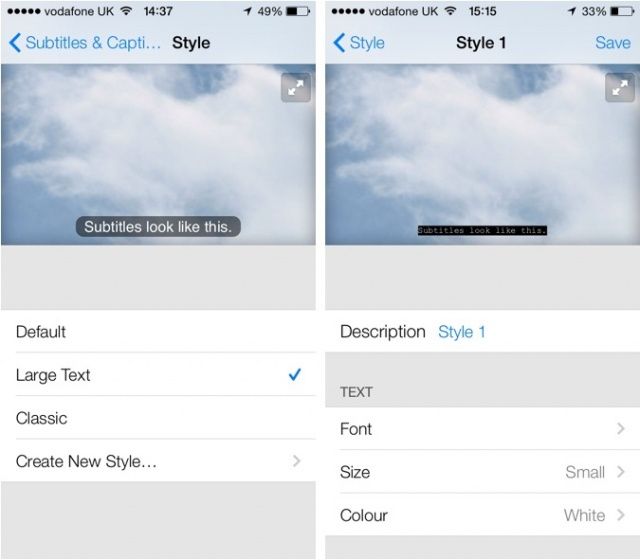
from CultofMac.com

iOS 7 will also allow users customization the font and size of subtitles. Currently the subtitles are small and can be hard to read particularly on the iPhone and iPod touch. In iOS 7 the font, size, and color of subtitles can be changed.

Use Camera to Redeem iTunes Gift Card
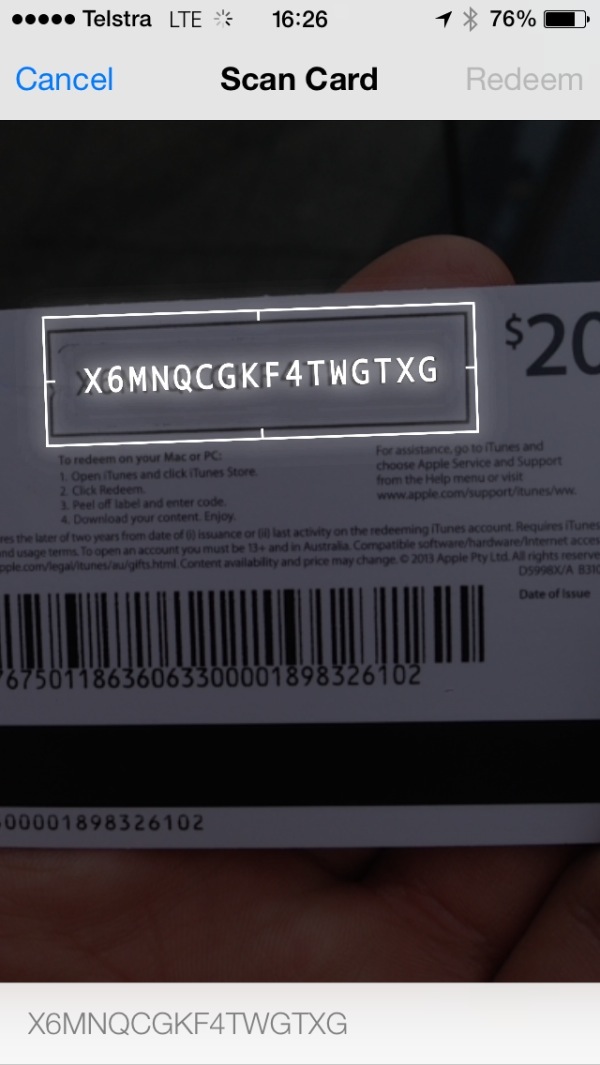
from iDownloadblog

One of the coolest features for the blind and visually impaired in iOS 7 is the ability to redeem iTunes gift cards using the devices camera. This will allow users who cannot read the small codes printed on the back of iTunes gift cards to redeem their gift cards easily without assistance. This feature originally debut on iTunes 11 on the Mac.

Siri Improvements


Along with updated Siri functionality Apple has added multiple high quality text-to-speech voices. The voices are both male and female and sound much better than the previous Siri voice. It is not clear is these new voices will be available for VoiceOver and Speak Selection or exclusive to Siri.

Switch Control

from AppAdvice.com

According to AppAdvice iOS 7 beta 2 also includes Switch Control. Little is known about the feature but the name suggests that iOS 7 will allow a user to control their device through switches. These switches are designed for people with physical disabilities who may only be able to activate one or two large switches. A separate post on MacRumors say that iOS 7 will allow users to control their device with head movements. From the screenshot it appears that head movement could be part of Switch Control and be used to activate a switch but it is unclear at this time. Below is a video of Switch Control.


New APIs to Help Developers Build More Accessible Apps

Last year in iOS 6 Apple included Guided Access which could put the device in a single app mode. Guided Access was targeted for users with autism. This year iOS 7 will add a Guided Access API for developers. This feature will allow developers to build apps that integrate deeply with Guided Access to give users more control of Guided Access.

iOS 7 is also reported to include new APIs to allow developers to detect blinking and smiling which could help disabled users control their device. It has also been reported on 9to5mac that Apple will include a text-to-speech API which would allow developers to easily integrate text-to-speech into their app.

iOS 7 is looking like a great release for all iOS users including users with disabilities. Apple is likely to change feature until iOS 7 is released to the public in the fall.

Comments

Popular posts from this blog

New in iOS 8: Built-in Braille Keyboard for Six-Dot Input

iOS 8 includes enhancements to VoiceOver , the built-in gesture based screen reader for people with visual impairments. One of the improvements is a new built-in Braille Keyboard for Six-Dot input. The new feature is similar to the BrailleTouch app released a few years ago with one major difference; the built-in option can be used to enter text into any app directly. The option can be enabled in the VoiceOver rotor. The Braille keyboard will offer VoiceOver users who are familiar with Braille an alternative, and possibly much faster text entry method. iOS 8 will also offers third-party keyboards such as Fleksy  which could also offer significantly faster text input for VoiceOver users. Once you turn the Braille keyboard on six positions will appear on screen representing the six Braille dots. When the device is held with the screen perpendicular to the floor it automatically enters screen away mode. When using this mode the user faces the screen away allowing three fingers ...

What's on my iPad? Assistive Apps I Use as a Dyslexic Student

As a dyslexic high school student my iPad , with a number of assistive apps, has become a very valuable tool. With my iPad I can read and fill out a PDF using text-to-speech, read a book with Voice Dream Reader , or map out my ideas with Inspiration Maps . The iPad mini is a perfect size for my needs allowing me to read sitting up, or reclining comfortably while listening to a book. Before I got the iPad I would either be tied to a computer to read using text-to-speech, or reading on the tiny screen of my iPhone . Here's a list of my favorite iPad apps and how I use them to help me both in and out of the classroom. Voice Dream Reader - $9.99 Voice Dream Reader is a text-to-speech reading app that allows users to read a wide variety of files through the app. The app includes the ability to buy very high quality text-to-speech voices for use with the app. Voice Dream Reader allows you to highlight  important parts of a passage as you read along.. One of my favorite features is...

Indoor Navigation System Will Soon Guide Blind Passengers at SFO

Imagine how difficult it would be to navigate a bustling airport terminal as a person with a visual impairment. Navigating security, finding baggage check, and finding the correct gate all while trying to make a last minute flight is daunting for even the most seasoned travelers. San Francisco International Airport (SFO) will soon implement a system to help guide blind and visually impaired travelers from curb to gate. Starting with Terminal 2 this fall, the airport will install some 500 iBeacons for a trial. Current solutions such as GPS do not work well indoors because they are unable to provide precise location information, but beacons allow more precise locationa. When a user with the indoor navigation app walks by a beacon it communicates with the user's smartphone and transmits the location. With the location information sent from the beacon, the app can then guide users to restrooms, restaurants, boarding gates, baggage claims, and even charging stations. Initially the app ...